
Langgraph

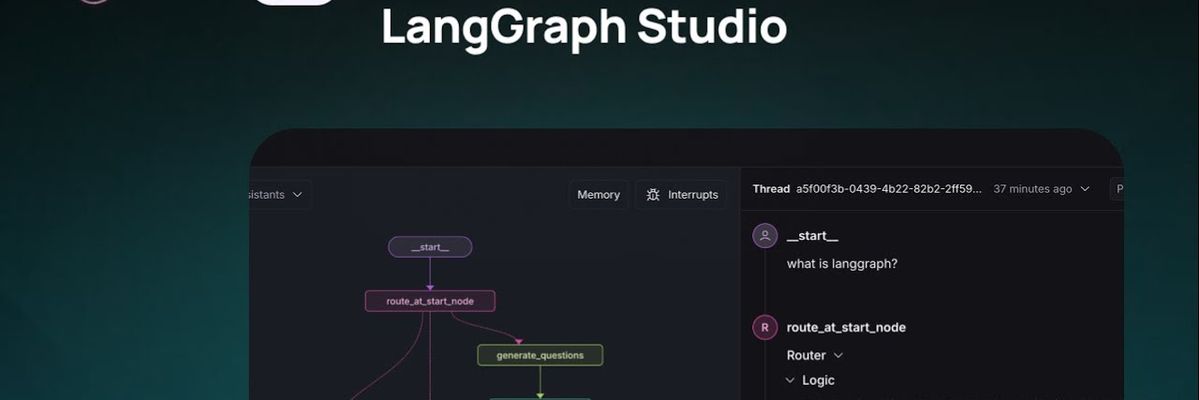
LangGraph is an open-source framework for building stateful, multi-agent applications powered by large language models. It enables developers to design, orchestrate, and manage intelligent agents that reason, remember, and collaborate across complex workflows. LangGraph provides a graph-based architecture for creating adaptive AI systems with persistent memory, tool integration, and controllable logic—making it ideal for scalable, production-ready agent development.
Langgraph Details
Overview of Langgraph
LangGraph is an open source framework for developers who want to build stateful AI agents, multi agent systems, and advanced workflows powered by large language models. Created by the team behind LangChain, it gives developers more control over how AI applications reason, make decisions, use tools, preserve information, and move through complex processes.
Instead of limiting an application to a simple sequence of prompts, LangGraph represents the workflow as a graph. Each node can contain a language model, tool, function, agent, or business rule. Developers can then connect those nodes with defined paths that support branching, repetition, approvals, retries, and conditional decisions.
This structure makes LangGraph useful for applications that need to operate across multiple steps while maintaining a consistent state. It can support everything from customer service agents and research assistants to internal business automation, data analysis, coding workflows, and enterprise AI systems.
What Is LangGraph?
LangGraph is an open source framework for building stateful applications and agent workflows using large language models. It is part of the broader LangChain ecosystem, but it focuses specifically on applications that require memory, controlled execution, multiple steps, and complex decision paths.
Traditional language model applications often follow a linear structure. A user submits a request, the model generates a response, and the interaction ends. LangGraph allows developers to build systems that can continue working through a task, evaluate intermediate results, call external tools, return to previous steps, and decide what should happen next.
The framework uses a graph based architecture. Nodes represent individual actions, models, tools, agents, or functions. Edges determine how information moves between those nodes. Conditional edges can direct the application toward different paths based on the current state, tool results, model output, or developer defined rules.
LangGraph also provides state management. This means an application can retain relevant information as it moves through a workflow. The stored state can include messages, tool outputs, task progress, user preferences, database results, completed actions, and other information needed by the agent.
Because developers control the graph structure, LangGraph can provide more predictable behavior than an entirely autonomous agent. The system can still reason and make decisions, but those decisions take place within boundaries established by the developer.
LangGraph can be used to create individual agents, teams of specialized agents, human approval workflows, long running processes, and applications that need to pause and resume at a later time.
How To Use LangGraph
Developers can install LangGraph in a Python environment and use it alongside LangChain, model provider libraries, databases, APIs, and custom tools. It can also be incorporated into an existing LangChain project when a basic chain needs more advanced state management or control flow.
The first step is to determine what information the application needs to remember. Developers define a state structure that can contain messages, task details, tool results, decisions, or other variables used throughout the workflow.
The next step is to create the nodes. A node can call a language model, search a database, retrieve a document, execute a function, interact with an API, evaluate an output, or request human approval. Each node receives the current state and returns an updated version of that state.
After the nodes are created, developers connect them through a graph. The graph determines the order in which nodes run and the conditions that move the application from one node to another. A workflow can include direct paths, conditional branches, loops, retries, and stopping points.
Developers can also add checkpoints and persistence. This allows an application to save its progress, pause execution, and resume later without restarting the entire workflow. Persistent state is especially useful for long running agents, customer support processes, approval systems, and tasks that depend on external events.
Once the graph is compiled, it can be tested with sample inputs. Developers can monitor how the state changes, review which nodes were triggered, inspect model responses, and evaluate how the application handled different conditions.
LangGraph can be combined with LangSmith for tracing, testing, debugging, and observability. This helps teams review the complete execution path of an agent and identify errors, unnecessary model calls, unexpected loops, or weak decision logic.
Applications built with LangGraph can be deployed through a preferred application framework, cloud environment, container platform, or API service. Developers remain responsible for selecting model providers, configuring storage, managing permissions, securing tools, and controlling access to external systems.
LangGraph Key Features
Graph Based Architecture
LangGraph lets developers represent AI workflows as connected graphs. This structure supports applications that need more flexibility than a standard linear chain.
Each node can perform a specific action, while the edges define how the application moves between actions. Developers can create workflows with multiple possible paths instead of forcing every request through the same sequence.
Stateful Workflows
LangGraph applications can maintain a shared state throughout the workflow. This state can contain conversation history, completed tasks, retrieved information, tool responses, errors, and other details needed for future decisions.
State management helps prevent the application from treating each step as an isolated interaction.
Conditional Routing
Developers can create conditions that determine which node should run next. The system can choose a path based on model output, a tool result, a user response, a database value, or a developer defined rule.
Conditional routing is useful for classification, escalation, validation, approvals, fallback logic, and personalized workflows.
Loops and Repeated Actions
LangGraph supports workflows that repeat an action until a condition is satisfied. An agent can continue researching, revising, testing, or evaluating its work before moving to the next stage.
Developers should define clear stopping conditions to prevent unnecessary or uncontrolled loops.
Multi Agent Coordination
LangGraph can coordinate multiple specialized agents within one application. One agent might conduct research, another might analyze findings, and another might prepare the final response.
The graph controls when each agent runs, what information it receives, and how its output affects the shared state.
Human Approval Steps
Developers can insert human review points into an automated workflow. The system can pause before performing a sensitive action, publishing content, changing data, sending a message, or executing a transaction.
This makes LangGraph suitable for applications where complete autonomy would create unnecessary risk.
Persistence and Checkpointing
LangGraph can save the state of a workflow at different points. If the application pauses, encounters an interruption, or requires human input, it can resume from a stored checkpoint.
Checkpointing can also make debugging easier because developers can review the state associated with a specific stage of the workflow.
Tool and API Integration
LangGraph agents can connect with external tools, databases, search systems, software platforms, and custom functions. These integrations allow an agent to perform actions rather than only generate text.
A tool can retrieve customer information, query a database, calculate a value, search internal documents, update a record, or interact with another application.
Model Provider Flexibility
Developers can use LangGraph with different language model providers. This makes it possible to select models based on cost, speed, reasoning ability, context length, privacy requirements, or application needs.
Different nodes can also use different models within the same graph.
Streaming Support
LangGraph can stream intermediate results and updates while a workflow is running. This can improve the user experience for tasks that require several steps or longer processing periods.
Applications can show progress, partial responses, tool activity, or completed stages instead of leaving the user without feedback.
Observability and Debugging
LangGraph can work with LangSmith to provide detailed visibility into agent execution. Developers can inspect model calls, tool usage, state changes, routing decisions, errors, and completion paths.
Observability is especially important when an application includes many nodes, tools, and possible routes.
Open Source Development
LangGraph is open source, allowing developers to inspect the framework, extend its capabilities, contribute improvements, and deploy applications within their preferred infrastructure.
Its connection to the LangChain ecosystem also gives developers access to a large collection of integrations, documentation, examples, and community resources.
LangGraph Use Cases
Autonomous AI Agents
LangGraph can be used to build agents that receive a goal, divide it into steps, use external tools, evaluate results, and continue working until the task is completed.
The graph structure gives developers control over how much autonomy the agent receives and which actions require validation.
Multi Agent Applications
Teams can create systems where multiple agents have different responsibilities. A research agent can gather information, an analysis agent can evaluate it, and a writing agent can prepare the final output.
LangGraph helps manage communication and task handoffs between those agents.
Customer Support Workflows
Customer support agents can classify requests, retrieve account information, search a knowledge base, suggest a resolution, and escalate the issue when necessary.
The application can maintain context across multiple interactions and follow a defined support process.
Research Assistants
LangGraph can power research applications that search multiple sources, organize findings, compare information, identify gaps, and prepare structured summaries.
A research workflow can include review stages that check whether the collected information is sufficient before generating a final answer.
Data Analysis Agents
Developers can connect language models with databases, spreadsheets, analytics platforms, and Python tools. The agent can interpret a question, retrieve relevant data, perform calculations, and explain the results.
Conditional logic can require the system to validate queries or confirm that the data is complete before presenting conclusions.
Content Production Workflows
LangGraph can coordinate research, outlining, drafting, fact checking, editing, and approval as separate stages in a content workflow.
Each stage can be handled by a different model, function, or agent while sharing the same project state.
Software Development Agents
Coding agents can inspect files, propose changes, write code, run tests, identify failures, and revise their work. The graph can require successful tests or human approval before the workflow is completed.
This structured approach can reduce the risk of allowing an agent to make unrestricted changes.
Business Process Automation
Companies can use LangGraph to automate processes involving documents, approvals, data entry, classification, reporting, and communication.
The framework is particularly useful when a process includes exceptions, repeated checks, or decisions that cannot be represented by a simple sequence.
Internal Knowledge Assistants
LangGraph can support assistants that search company documents, retrieve information from internal systems, verify permissions, and generate answers using approved sources.
State management helps the assistant remember the current task and maintain context while working across several systems.
DevOps and Technical Operations
Technical teams can build agents that monitor systems, inspect logs, identify common problems, collect diagnostic information, and recommend actions.
Human approval can be required before the agent performs changes that affect infrastructure or production environments.
LangGraph FAQ
Is LangGraph free to use?
LangGraph is an open source framework that developers can install and use in their own applications. However, the complete cost of a LangGraph application may include model usage, hosting, databases, monitoring services, storage, and other infrastructure.
Is LangGraph a language model?
No. LangGraph is not a language model. It is a framework for organizing how models, tools, functions, agents, and application logic work together.
Developers still need to connect the framework to a supported language model or another system that can perform the required actions.
Does LangGraph require LangChain?
LangGraph is part of the LangChain ecosystem and is designed to work well with LangChain components. Developers can also use custom Python functions, tools, and model integrations within a LangGraph workflow.
Can LangGraph support multiple agents?
Yes. Developers can create multiple agents and coordinate them through a shared graph. Each agent can have its own instructions, tools, models, responsibilities, and access to the application state.
Does LangGraph include memory?
LangGraph provides state management and supports persistent workflows. Developers decide what information should be stored, how long it should be retained, and which storage system should be used.
The framework does not automatically determine an application’s privacy, retention, or security policies.
Can LangGraph run workflows in a loop?
Yes. A graph can return to a previous node and repeat an action. This can be useful for revision, validation, research, testing, and iterative problem solving.
Developers should add limits and stopping conditions to control cost and prevent infinite execution.
Can LangGraph pause for human input?
Yes. A workflow can pause at a defined point and wait for a person to review information, provide feedback, approve an action, or select the next step.
The saved state can then be used to resume the workflow.
Can LangGraph applications be deployed in production?
Yes. Developers can deploy LangGraph applications using their preferred hosting environment, API framework, cloud platform, or container system.
Production deployment requires appropriate testing, monitoring, authentication, permission controls, storage, error handling, and model usage management.
Does LangGraph store user data?
LangGraph provides mechanisms for managing and persisting application state, but developers control the storage configuration. Data handling depends on the selected database, checkpoint system, model provider, hosting environment, and application settings.
Teams should configure retention, encryption, access controls, and privacy practices based on their use case.
What programming languages does LangGraph support?
LangGraph is commonly used in Python and is also available for JavaScript and TypeScript development. The appropriate version depends on the application environment and development stack.
What is the difference between a graph and a chain?
A chain usually moves through a predefined sequence of steps. A graph can include multiple paths, branches, loops, interruptions, and decisions.
Chains can work well for predictable tasks, while graphs are more suitable for workflows that need flexible routing and stateful execution.
Is LangGraph suitable for beginners?
Developers who already understand Python or JavaScript, APIs, and language model applications can begin with basic LangGraph workflows. More advanced applications may require knowledge of state management, asynchronous execution, databases, tool permissions, and production monitoring.
Why We Featured LangGraph on Add AI Agents
LangGraph represents an important shift from basic prompt chains toward structured, stateful AI applications. It gives developers a practical way to create agents that can reason across multiple steps, use tools, remember relevant information, and operate within clearly defined workflows.
We featured LangGraph because its graph based approach provides a strong balance between flexibility and developer control. Teams can create autonomous behavior without giving an agent unrestricted authority over every decision.
Its support for state management, conditional routing, loops, persistence, human review, and multi agent coordination makes it useful for a wide range of AI applications. Developers can begin with a small workflow and expand it as the application requires more tools, agents, data sources, and decision logic.
LangGraph is especially relevant for developers moving beyond simple chatbots. It provides the foundation needed to build AI systems that can manage longer tasks, interact with software, coordinate specialized agents, and maintain continuity across complex processes.
LangGraph Vs. LangChain
LangGraph and LangChain are closely related, but they are designed for different levels of application complexity. LangChain provides components for connecting language models with prompts, tools, retrievers, databases, and external services. It is commonly used to build retrieval applications, tool calling workflows, chat interfaces, and structured sequences of model operations.
LangGraph builds on many of those concepts by adding graph based control flow, persistent state, loops, conditional routing, interruptions, and multi agent coordination. It is better suited for applications that need to remember progress, revisit previous steps, pause for approval, or choose between several possible execution paths.
Developers may use LangChain for straightforward model applications and use LangGraph when the workflow becomes more stateful or agentic. The two frameworks can also be used together, with LangChain providing the models, tools, and retrieval components that operate inside a LangGraph workflow. Learn more about LangChain to compare its chain based development tools with LangGraph’s stateful graph architecture.
Explore More AI Agents
Discover other AI agents and tools to enhance your workflow and productivity.
Browse All AgentsRelated AI Agents
View All Agents →
Tale
Tale is an open-source project workspace for teams and AI agents. Teammates plan tasks on a shared board, assign work to people or agents, and review the results together, while agents run in persistent sandboxes using runtimes such as Claude Code and Codex. It combines task boards, shared knowledge, workflows, and governance controls, and can be self-hosted with Docker or run as managed Cloud. Tale is MIT licensed, and the free Community edition includes every feature.

VoiceDrop
VoiceDrop is a ringless voicemail and SMS platform built for sales teams. It clones a user’s voice from roughly a 30-second sample and delivers personalized voicemails to US mobile and VoIP numbers without ringing the phone, with two-way SMS in the same workflow. Billing applies only to successful deliveries, and the platform includes SOC 2 Type II compliance, Do Not Call suppression, phone validation, a REST API, and Zapier and Make integrations.
Arvow
Arvow is an AI SEO platform for marketers and agencies. Its agents help research, write, and publish content in a brand’s voice, identify technical SEO issues, and find relevant sites for contextual backlinks. Arvow also tracks brand mentions across AI search tools, bringing content, site optimization, link building, and AI visibility into one platform.
Trending AI Agents
View All Agents →
Site Speak
SiteSpeak AI lets you train a custom chatbot on your website content, FAQs, and documents. Site Speak AI can answer visitor questions instantly, 24/7, with no coding required.

Murf AI
Murf AI is a text-to-speech platform that transforms written content into lifelike voiceovers. It’s perfect for creators, educators, and businesses needing high quality narration without recording audio manually.

Synthesia
Synthesia is an AI video generation platform that lets users create professional-looking videos using realistic AI avatars. It enables anyone to turn text into engaging videos in minutes—no cameras, microphones, or actors required.
Tale
Tale is an open-source project workspace for teams and AI agents. Teammates plan tasks on a shared board, assign work to people or agents, and review the results together, while agents run in persistent sandboxes using runtimes such as Claude Code and Codex. It combines task boards, shared knowledge, workflows, and governance controls, and can be self-hosted with Docker or run as managed Cloud. Tale is MIT licensed, and the free Community edition includes every feature.
VoiceDrop
VoiceDrop is a ringless voicemail and SMS platform built for sales teams. It clones a user’s voice from roughly a 30-second sample and delivers personalized voicemails to US mobile and VoIP numbers without ringing the phone, with two-way SMS in the same workflow. Billing applies only to successful deliveries, and the platform includes SOC 2 Type II compliance, Do Not Call suppression, phone validation, a REST API, and Zapier and Make integrations.
Arvow
Arvow is an AI SEO platform for marketers and agencies. Its agents help research, write, and publish content in a brand’s voice, identify technical SEO issues, and find relevant sites for contextual backlinks. Arvow also tracks brand mentions across AI search tools, bringing content, site optimization, link building, and AI visibility into one platform.