
Tasklet

Tasklet is an AI-powered automation platform that builds and runs agents capable of handling real business operations. By connecting to thousands of tools, APIs, and even full computers in the cloud, it eliminates manual work across departments. With reasoning capabilities, scheduling, and adaptive logic, Tasklet allows companies to operate smarter and faster—automating everything from daily briefings to CRM updates through simple natural language instructions.
Tasklet Details
Overview of Tasklet
Tasklet is an AI automation platform that helps teams create agents capable of completing ongoing business tasks across connected applications, company systems, websites, and cloud environments. Users describe what they want accomplished in plain language, connect the required tools, and allow the agent to execute the process independently.
Unlike a basic chatbot that only responds to questions, Tasklet is designed to take action. Its agents can monitor incoming events, research information, update records, process files, use web applications, generate reports, and coordinate work between multiple platforms. Agents run in the cloud, which means workflows can continue even when the user is offline or their computer is turned off.
Tasklet can support individual tasks as well as recurring responsibilities. A team could use it to prepare daily briefings, enrich new sales leads, reconcile invoices, organize meeting follow ups, update customer records, or create internal dashboards. This makes the platform useful for companies that want to reduce repetitive work without building every automation manually.
What Is Tasklet
Tasklet is an AI command center for creating, managing, and sharing autonomous business agents. These agents combine language model reasoning with integrations, browser access, file processing, code execution, scheduling, and event based triggers.
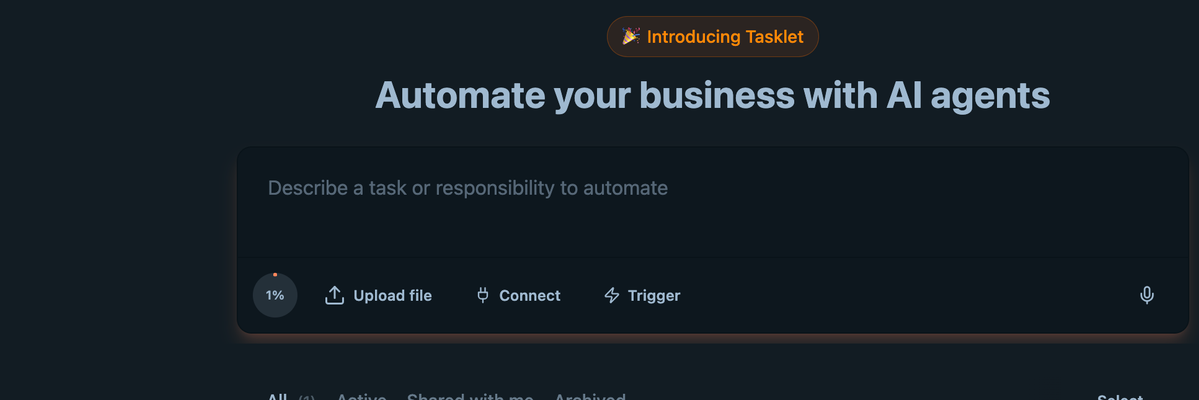
Users begin by explaining a task or responsibility in ordinary language. Tasklet interprets the request, determines which connected systems are needed, and creates an agent that can carry out the work. This removes much of the technical setup traditionally associated with workflow automation platforms.
Tasklet agents can connect with commonly used business tools such as Gmail, Slack, Google Drive, Google Calendar, HubSpot, Salesforce, Asana, Airtable, Stripe, Calendly, Outlook, Microsoft Teams, Dropbox, QuickBooks, and Linear. The platform can also connect with HTTP APIs, MCP servers, and private internal systems.
When an action cannot be completed through an API, Tasklet can use a browser inside a secure cloud computer. This allows an agent to sign in to web applications, navigate interfaces, download files, enter information, and complete steps that would otherwise require manual interaction.
Tasklet is built for both individual users and teams. Companies can share agents, connections, knowledge, and approved credentials without requiring every employee to configure the same workflow independently. Teams can also provide agents with internal instructions, brand information, procedures, and business context.
How To Use Tasklet
Describe the Responsibility
Start by explaining what you want the agent to accomplish. The description can be a single task or an ongoing responsibility.
For example, you could ask Tasklet to research every new sales lead, prepare a summary before each customer call, or organize incoming support requests. Clear instructions should identify the desired result, the information the agent should use, and where the completed work should be delivered.
Connect Your Business Tools
Connect the applications and data sources required for the workflow. Tasklet can work with communication platforms, customer relationship management systems, calendars, project management tools, accounting software, cloud storage services, and many other business applications.
A single connection can be shared with approved team members. This allows employees to use an agent without exposing passwords, private credentials, or API keys.
Add Company Knowledge
Provide the agent with relevant company information, operating procedures, brand guidelines, documents, and instructions. This context helps the agent make decisions that are consistent with how the organization works.
For example, a customer support agent may need access to product documentation and response guidelines. A sales research agent may need qualification criteria, account priorities, and information about the company’s ideal customer.
Choose a Trigger
Decide when the agent should run. Tasklet agents can be started manually, scheduled for a specific time, or activated by an event.
An agent could run every weekday morning, respond whenever a new email arrives, begin when a contact is added to a CRM, or activate after receiving a webhook from another system.
Review the Agent’s Actions
Test the workflow and review the agent’s output before relying on it for important business processes. Confirm that it is accessing the correct information, updating the intended systems, and producing results in the expected format.
Instructions can be adjusted as the workflow develops. Teams can refine the agent’s responsibilities, add new knowledge, change connected tools, and improve how exceptions are handled.
Share the Agent With Your Team
Once the agent is working correctly, it can be shared with other team members. Employees can run the same approved agent instead of creating separate prompts or rebuilding the workflow.
Shared agents also create more consistent processes across departments. Everyone can use the same instructions, company knowledge, and connected systems.
Monitor Usage and Results
Review completed runs, usage activity, and agent performance. Monitoring helps teams identify failed steps, missing permissions, inaccurate outputs, or processes that need clearer instructions.
Over time, businesses can expand successful agents into broader workflows that take ownership of recurring responsibilities rather than completing only isolated tasks.
Tasklet Key Features
Natural Language Agent Creation
Tasklet allows users to create agents by describing responsibilities in plain English. Users do not need to build complicated flowcharts or manually configure every possible step.
The platform interprets the objective and determines how the connected tools can be used to complete it. This makes automation more accessible to employees who do not have programming or workflow engineering experience.
Extensive Business Integrations
Tasklet connects with a wide range of sales, marketing, communication, productivity, finance, and project management applications. Agents can collect information from one system, process it, and send the result to another system.
This connectivity allows companies to automate processes that normally require employees to switch repeatedly between different applications.
API and MCP Connectivity
In addition to supported application connections, Tasklet can work with HTTP APIs and MCP servers. This gives technical teams greater flexibility when connecting private software, internal databases, custom services, or specialized tools.
API connectivity also allows companies to incorporate Tasklet into existing business infrastructure instead of limiting agents to a fixed collection of applications.
Secure Cloud Computers
Each agent can operate inside a cloud based environment that supports browser activity, file processing, data analysis, and code execution. Work is performed remotely rather than depending on the user’s personal computer.
A cloud computer is especially useful when an agent needs to navigate a website, process a large file, run a script, or interact with software that does not provide a usable API.
Browser Based Task Execution
Tasklet agents can complete work through web interfaces when direct integrations are unavailable. An agent may open a browser, access an authenticated application, navigate pages, download information, and submit updates.
This expands the number of processes that can be automated, including older systems and web portals that were not designed for modern automation platforms.
Scheduled and Event Based Agents
Agents can run according to a schedule or react to activity in connected systems. This allows Tasklet to support recurring work and respond quickly when important events occur.
Common triggers include new emails, CRM updates, calendar events, Slack messages, form submissions, and external webhooks.
Autonomous Task Execution
Tasklet is designed to move beyond generating instructions or suggestions. Its agents can complete multiple connected actions and continue working until the assigned objective is finished.
An agent could collect data, analyze it, create a document, update a database, and send a notification as part of one responsibility.
Shared Agents and Connections
Organizations can build an agent once and make it available to multiple employees. Teams can also share approved application connections while keeping the underlying credentials protected.
This reduces duplicated setup and helps companies maintain consistent workflows across different users and departments.
Company Knowledge and Skills
Teams can provide Tasklet with company procedures, documents, brand standards, and operational context. This information allows agents to complete tasks using organization specific knowledge rather than relying only on general model training.
Agents can be updated as policies, priorities, and business processes change.
Internal Application Creation
Tasklet can create practical internal applications from natural language instructions. These may include dashboards, trackers, calculators, approval systems, and tools for viewing or updating company information.
The resulting applications can connect with real business data and be shared with other members of the organization.
Multiple AI Model Access
Tasklet can use models from several major AI providers. Different tasks may benefit from different capabilities, including reasoning, transcription, image generation, and content creation.
Supporting multiple models allows the platform to select technology that is appropriate for each part of a workflow.
Team Controls and Usage Management
Tasklet provides controls for managing access, usage, shared resources, and spending across a team. Organizations can determine which people can access specific agents, connections, and company information.
These controls are important for companies that want to expand AI adoption without giving every employee unrestricted access to credentials or billing accounts.
Tasklet Use Cases
Daily Team Briefings
Tasklet can collect information from calendars, inboxes, project management tools, and internal documents to create a daily briefing. The completed summary can include upcoming meetings, overdue tasks, important messages, deadlines, and current priorities.
The briefing can be delivered automatically through email, Slack, Microsoft Teams, Notion, or another connected application.
Sales Lead Research
When a new lead enters a CRM, Tasklet can research the company, review its website, gather useful account information, and prepare a summary for the sales team.
The agent can also update the CRM record, identify possible talking points, and create a personalized briefing before a scheduled call.
Customer Support Assistance
Tasklet can monitor a support inbox, identify the customer, locate relevant information in a knowledge base, and prepare a response. It can also classify the request, update a support system, or route complex cases to the correct employee.
This can reduce response time while allowing human support teams to focus on cases that require judgment or personal attention.
CRM Data Management
Tasklet can create and update CRM records using information found in emails, meeting notes, forms, spreadsheets, and other systems. It can add contacts, update opportunity stages, attach research, and correct incomplete fields.
Automating these updates helps sales teams maintain cleaner records without spending as much time on manual data entry.
Meeting Follow Ups
After a meeting, Tasklet can process a transcript or summary, identify assigned actions, create tasks in a project management platform, and email participants with the agreed next steps.
This helps teams turn conversations into documented responsibilities without relying on one person to organize everything manually.
Project and Team Summaries
Tasklet can collect updates from tools such as Slack, Asana, ClickUp, Linear, and Google Calendar to create a weekly project summary. The report can show completed work, current blockers, approaching deadlines, and assigned owners.
Managers can use these summaries to understand progress without manually collecting updates from every team member.
Invoice Processing
An agent can access vendor portals, download invoices, compare them with transaction records, and organize approved expenses in accounting software.
Tasklet can also create reconciliation reports and flag records that require human review.
Marketing Operations
Marketing teams can use Tasklet to research prospects, organize campaign data, prepare content briefs, update spreadsheets, and distribute reports.
Agents can also collect performance information from multiple platforms and combine it into a single summary or dashboard.
Recruiting Workflows
Tasklet can help organize candidate information, review application materials, update recruiting systems, coordinate calendars, and prepare interview briefings.
It can also create follow up tasks and keep hiring teams informed when a candidate moves to a new stage.
Competitive Research
A Tasklet agent can visit competitor websites, collect product or pricing information, capture screenshots, compare messaging, and create a structured report.
The agent can repeat the process on a schedule so teams receive updated competitive intelligence without performing the same research manually.
File and Data Processing
Tasklet can process spreadsheets, documents, reports, images, and other files inside its cloud environment. Agents can clean data, merge records, calculate results, create charts, and export completed files.
This can be useful for operations teams that regularly receive files requiring repetitive preparation or analysis.
Internal Tool Creation
Teams can ask Tasklet to create a dashboard, calculator, tracker, approval workflow, or other internal application. The application can be connected to existing company data and shared with employees.
This allows businesses to create focused operational tools without waiting for a complete custom software development project.
Website and Portal Workflows
When a business process depends on a web portal, Tasklet can use its browser to perform the necessary actions. This may include downloading reports, submitting information, updating records, or collecting data from authenticated websites.
Browser automation is useful for systems that do not support direct integrations.
Tasklet FAQ
What does Tasklet do?
Tasklet creates AI agents that complete business tasks across applications, APIs, files, websites, and cloud environments. Agents can perform individual assignments or take responsibility for recurring workflows.
Is Tasklet a chatbot?
Tasklet includes conversational instructions, but it is designed to do more than answer questions. Its agents can use tools, update systems, process files, browse websites, run code, and complete multistep tasks.
Do I need coding experience to use Tasklet?
Coding experience is not required for basic agent creation. Users can describe tasks in plain language and connect supported applications.
Developers and technical teams can use APIs, MCP servers, webhooks, and custom systems for more advanced workflows.
Can Tasklet run while my computer is turned off?
Yes. Tasklet agents run in the cloud, so scheduled and event based workflows can continue without keeping a personal computer active.
What applications can Tasklet connect with?
Tasklet supports many commonly used business applications, including email, calendars, cloud storage, CRM platforms, project management systems, accounting tools, and communication services.
It can also connect with HTTP APIs, MCP servers, and private internal systems.
Can Tasklet automate software without an API?
Yes. Tasklet can use a browser inside a cloud computer to interact with websites and web applications. This allows agents to complete tasks through a user interface when a direct integration is not available.
Can Tasklet process files and data?
Yes. Agents can work with documents, spreadsheets, reports, downloaded files, and other business data. They can organize information, run calculations, generate reports, and create new output files.
Can teams share Tasklet agents?
Yes. Teams can share agents, approved connections, company knowledge, and reusable skills. This allows multiple employees to use the same workflow without rebuilding it.
Can Tasklet create internal applications?
Yes. Tasklet can generate internal dashboards, trackers, calculators, approval workflows, and other practical applications based on natural language instructions.
How can Tasklet agents be triggered?
Agents can be started manually, run on a schedule, or activated by an event. Events may include new emails, CRM changes, calendar activity, Slack messages, or webhooks.
Is Tasklet suitable for recurring workflows?
Yes. Tasklet is designed for both one time tasks and ongoing responsibilities. An agent can monitor for new activity and automatically begin work whenever its trigger conditions are met.
Does Tasklet support multiple AI models?
Yes. Tasklet provides access to models from major AI providers and can use different model capabilities for reasoning, transcription, image creation, and other tasks.
Is Tasklet designed for business teams?
Yes. Tasklet includes shared agents, protected connections, company knowledge, access controls, usage management, and security features intended for organizational use.
Is Tasklet free?
Tasklet allows users to start free, while additional capabilities and team usage may require a paid plan. Available plans and usage limits should be reviewed on the Tasklet pricing page because pricing may change over time.
Explore More AI Agents
Discover other AI agents and tools to enhance your workflow and productivity.
Browse All AgentsRelated AI Agents
View All Agents →
Tale
Tale is an open-source project workspace for teams and AI agents. Teammates plan tasks on a shared board, assign work to people or agents, and review the results together, while agents run in persistent sandboxes using runtimes such as Claude Code and Codex. It combines task boards, shared knowledge, workflows, and governance controls, and can be self-hosted with Docker or run as managed Cloud. Tale is MIT licensed, and the free Community edition includes every feature.

VoiceDrop
VoiceDrop is a ringless voicemail and SMS platform built for sales teams. It clones a user’s voice from roughly a 30-second sample and delivers personalized voicemails to US mobile and VoIP numbers without ringing the phone, with two-way SMS in the same workflow. Billing applies only to successful deliveries, and the platform includes SOC 2 Type II compliance, Do Not Call suppression, phone validation, a REST API, and Zapier and Make integrations.

Arvow
Arvow is an AI SEO platform for marketers and agencies. Its agents help research, write, and publish content in a brand’s voice, identify technical SEO issues, and find relevant sites for contextual backlinks. Arvow also tracks brand mentions across AI search tools, bringing content, site optimization, link building, and AI visibility into one platform.
Trending AI Agents
View All Agents →
Site Speak
SiteSpeak AI lets you train a custom chatbot on your website content, FAQs, and documents. Site Speak AI can answer visitor questions instantly, 24/7, with no coding required.

Murf AI
Murf AI is a text-to-speech platform that transforms written content into lifelike voiceovers. It’s perfect for creators, educators, and businesses needing high quality narration without recording audio manually.

Synthesia
Synthesia is an AI video generation platform that lets users create professional-looking videos using realistic AI avatars. It enables anyone to turn text into engaging videos in minutes—no cameras, microphones, or actors required.
Tale
Tale is an open-source project workspace for teams and AI agents. Teammates plan tasks on a shared board, assign work to people or agents, and review the results together, while agents run in persistent sandboxes using runtimes such as Claude Code and Codex. It combines task boards, shared knowledge, workflows, and governance controls, and can be self-hosted with Docker or run as managed Cloud. Tale is MIT licensed, and the free Community edition includes every feature.
VoiceDrop
VoiceDrop is a ringless voicemail and SMS platform built for sales teams. It clones a user’s voice from roughly a 30-second sample and delivers personalized voicemails to US mobile and VoIP numbers without ringing the phone, with two-way SMS in the same workflow. Billing applies only to successful deliveries, and the platform includes SOC 2 Type II compliance, Do Not Call suppression, phone validation, a REST API, and Zapier and Make integrations.
Arvow
Arvow is an AI SEO platform for marketers and agencies. Its agents help research, write, and publish content in a brand’s voice, identify technical SEO issues, and find relevant sites for contextual backlinks. Arvow also tracks brand mentions across AI search tools, bringing content, site optimization, link building, and AI visibility into one platform.