
Portreya
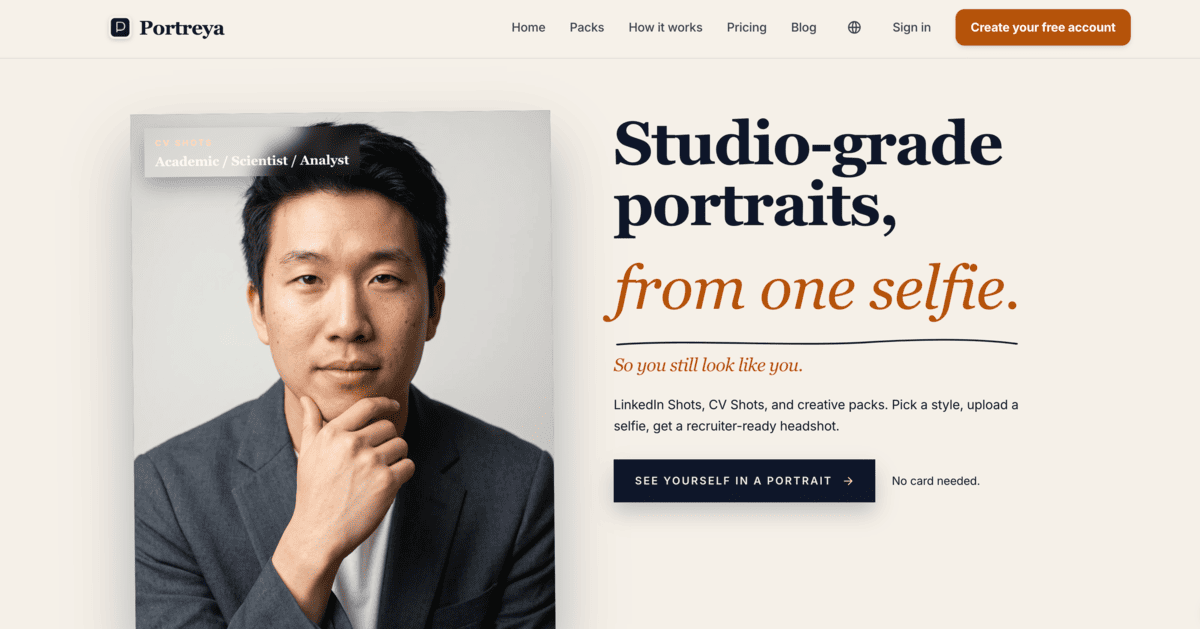
Portreya is an AI portrait generator that transforms a clear selfie into polished, studio quality photos in about a minute. Users can choose from portrait packs designed for LinkedIn profiles, CVs, dating apps, social media, professional websites, industry profiles, and personal branding. The platform lets users customize details such as clothing, backgrounds, lighting, poses, and overall style while preserving their recognizable facial features. Portreya uses a pay as you go pricing model with no subscription, and paid photos can be downloaded and used across professional or personal platforms. Users can also request refinements when a generated portrait needs small adjustments.
Portreya Details
Reviewed by Add AI Directory Editorial Team
View our review methodology →Sources
- Testing status
- Researched Only
- Availability status
- Not yet verified
- Limitations
- No additional limitations documented.
Ready to try Portreya?
Check out Portreya for pricing and explore how it can streamline your workflow.
Portreya is an AI portrait generator that turns a clear selfie into polished, studio quality portraits. The platform is designed for people who need professional headshots, CV photos, dating profile images, social media portraits, personal branding photos, or industry specific profile pictures without booking a traditional photography session. Users choose a portrait pack, upload a front facing selfie, customize the desired appearance, and receive generated photos in about one minute.
What Is Portreya?
Portreya is an AI powered photography platform that creates realistic portraits from a user supplied selfie. Instead of generating random characters or heavily stylized avatars, Portreya focuses on preserving the facial structure, expression, and recognizable features of the person in the original image.
The platform changes elements that would normally be controlled during a professional photography session, including lighting, clothing, pose, crop, background, and overall presentation. This allows users to create photos for different situations while maintaining a consistent and recognizable appearance.
Portreya organizes its portrait styles into packs built around specific purposes. These include LinkedIn headshots, CV photos, dating profile images, personal social media pictures, studio portraits, virtual outfit photos, and industry focused portraits.
The platform uses a pay as you go pricing model rather than a monthly subscription. Users pay for a selected number of generated photos and can use the finished images across professional and personal platforms.
How To Use Portreya
Start by creating a free Portreya account and selecting the portrait pack that matches how you plan to use the photo. Available packs are designed for platforms and situations such as LinkedIn, CV applications, dating profiles, personal social accounts, professional websites, and industry profiles.
Upload one clear, front facing selfie taken with a phone or camera. Additional source photos may help provide more visual information, but Portreya is designed to generate portraits from a single suitable image. The platform may alert users when an uploaded selfie is unlikely to produce a reliable result.
Next, choose the preferred styling for the portrait. Depending on the selected pack, users can adjust details such as clothing, pose, background, framing, lighting, and visual tone. A professional profile may use a neutral background and formal clothing, while a social portrait may use a more casual environment and relaxed presentation.
After confirming the selected style, Portreya processes the image and generates the finished portrait. Results are generally delivered in about 60 seconds.
Users can download paid portraits and use them on LinkedIn, company websites, CVs, social media profiles, dating platforms, speaker biographies, and other personal or professional materials. When a small detail needs to be changed, users can submit refinement instructions for the selected photo.
Portreya Key Features
Portraits From One Selfie
Portreya can create a complete portrait from one clear, front facing selfie. Users do not need professional source photos, complicated equipment, or an existing studio headshot.
Realistic Facial Preservation
The platform is designed to maintain the facial structure, expression, and recognizable characteristics of the person in the uploaded image. Styling elements may change, but the finished portrait is intended to continue looking like the original person.
Purpose Specific Portrait Packs
Portreya offers different packs based on where the final image will be used. Each pack applies its own approach to clothing, crop, background, pose, and presentation.
LinkedIn Headshots
LinkedIn portrait styles are designed for small profile icons, recruiter searches, company directories, and personal branding. These images typically use a close crop and professional styling that remains visible within a circular profile frame.
CV Portraits
CV portrait styles use formal clothing, neutral backgrounds, and document friendly framing. These portraits may be useful for applications in countries and industries where including a photo on a CV is common.
Dating Profile Photos
Dating portrait packs focus on creating approachable and natural looking profile pictures. Available styles may include relaxed portraits, lifestyle settings, travel inspired backgrounds, and warm lighting.
Personal Social Media Photos
Social portrait packs are designed for platforms where users may want a more casual or creative appearance. These images can include candid styling, city backgrounds, flash photography effects, or other personal profile aesthetics.
Studio Portraits
Studio packs provide polished portraits with controlled lighting and professional backgrounds. These images may be used for websites, media profiles, company biographies, portfolios, or personal branding.
Virtual Outfit Options
Portreya can change the clothing shown in a portrait without requiring the user to take another source photo. This allows users to test professional, casual, formal, or industry appropriate outfits.
Industry Focused Portraits
Industry portrait packs help users create images that match the visual expectations of their profession. A consultant, executive, creative professional, healthcare worker, or tradesperson may need a different style of portrait.
Fast Image Generation
Generated portraits are generally returned in about one minute. This makes Portreya useful for people who need a profile photo without arranging a full photography session.
Photo Refinement
Users can request changes when a generated image contains a detail they would like to adjust. Refinement instructions can be used to modify elements such as clothing, background, styling, or other visible details.
Pay As You Go Pricing
Portreya does not require an ongoing subscription. Users purchase a set number of photos and can add more when needed.
Downloadable Usage Rights
Paid photos can be downloaded and used across professional and personal platforms. This includes websites, social profiles, job applications, company directories, dating profiles, and speaker pages.
Portreya Use Cases
Creating a LinkedIn Profile Photo
Professionals can use Portreya to replace an outdated selfie with a cleaner headshot designed for LinkedIn. The close crop and professional styling can help the image remain clear within the platform profile frame.
Updating a Company Biography
Business owners, employees, consultants, and executives can generate portraits for company team pages, professional directories, email profiles, and staff biographies.
Preparing a Professional CV Photo
Job seekers applying in regions where CV photos are commonly used can create formal portraits with neutral backgrounds and document appropriate framing.
Improving a Dating Profile
Users can generate approachable portraits for dating apps without relying only on mirror selfies or old social photos. Different styles can communicate personality, interests, or a more relaxed appearance.
Building a Personal Brand
Creators, consultants, freelancers, speakers, and entrepreneurs can generate multiple portraits for use across websites, newsletters, social media accounts, podcast appearances, and promotional materials.
Creating Social Media Profile Pictures
Portreya can produce casual and creative images for Instagram, WhatsApp, Facebook, X, and other personal social accounts.
Testing Different Professional Styles
Users can compare formal clothing, casual business attire, different backgrounds, and alternative portrait styles before choosing the image that best represents them.
Generating Speaker and Author Photos
Authors, podcast guests, conference speakers, and subject matter experts can create polished portraits for event pages, article biographies, book profiles, and media appearances.
Producing Industry Specific Headshots
Professionals can choose a visual style that fits their field. This may include corporate portraits, creative profile photos, advisory headshots, or practical industry focused images.
Replacing an Outdated Headshot
Portreya can help users create a new portrait after changing their hairstyle, clothing preferences, professional role, or personal brand.
Portreya FAQ
Does Portreya Require Professional Source Photos?
No. Portreya is designed to work with one clear, front facing selfie taken with a phone or camera. A well lit image with an unobstructed view of the face is more likely to produce an accurate result.
How Long Does Portreya Take?
Portreya generally generates portraits in about 60 seconds. Processing time may vary depending on the selected pack, requested settings, and platform demand.
Will the Finished Portrait Look Like Me?
Portreya is designed to preserve recognizable facial features, including facial structure and expression. The platform primarily changes photography elements such as clothing, background, lighting, pose, and crop.
Can I Change a Generated Photo?
Yes. Paid photos can be refined by providing instructions about what should be changed. This can help correct a small detail or adjust the visual style of an image.
Is Portreya Free?
Users can create an account and explore the platform without providing a card. Downloading and keeping generated portraits requires purchasing a photo package.
Does Portreya Require a Subscription?
No. Portreya uses a one time payment model. Users purchase a set of photos and can buy additional photos later when needed.
What Types of Photos Can Portreya Create?
Portreya can create LinkedIn headshots, CV portraits, dating profile photos, personal social images, studio portraits, virtual outfit photos, and industry specific headshots.
Can I Use Portreya Photos for Work?
Yes. Paid portraits can be used on LinkedIn, company websites, professional directories, CVs, speaker biographies, portfolios, and other work related platforms.
Can I Use Portreya Photos on Dating Apps?
Yes. Portreya offers portrait packs specifically designed for dating profiles. These styles focus on creating approachable, relaxed, and lifestyle oriented images.
Can I Use Portreya Photos on My Website?
Yes. Paid images can be used on personal websites, company pages, portfolios, landing pages, team profiles, and author biographies.
What Makes Portreya Different From a General AI Image Generator?
Portreya is focused specifically on portraits of the person uploading the source image. Its packs are organized around practical uses such as LinkedIn, CVs, dating profiles, social media, studio photography, and professional industries.
What Happens If My Selfie Is Not Suitable?
Portreya may notify users when an uploaded selfie is unlikely to generate a reliable portrait. A clear, front facing photo with good lighting and no major facial obstructions is recommended.
Can I Generate More Than One Style?
Yes. Users can select different portrait packs and generate photos for multiple situations. A person may create one formal image for LinkedIn, another for a company website, and a more casual portrait for social media.
Who Should Use Portreya?
Portreya may be useful for job seekers, professionals, founders, freelancers, consultants, creators, speakers, authors, dating app users, and anyone who needs an updated portrait without scheduling a traditional photo session.
Why We Featured Portreya on Add AI Directory
Portreya provides a focused AI portrait experience built around practical personal and professional needs. Instead of requiring users to learn complicated image prompts, the platform organizes its styles into portrait packs for LinkedIn, CVs, dating profiles, social media, studio photography, outfits, and professional industries.
Its ability to create a polished portrait from one clear selfie makes professional looking photography more accessible to people who may not have the time, budget, or equipment for a traditional photo session. Fast generation, portrait refinements, realistic facial preservation, and one time pricing also make Portreya a useful option for users who need updated profile images across several platforms.
Ready to try Portreya?
Check out Portreya for pricing and explore how it can streamline your workflow.
Explore More AI Agents
Discover other AI agents and tools to enhance your workflow and productivity.
Browse all AI agentsSimilar to Portreya

ReWords AI
ReWords AI is an AI image text editor that lets users replace words embedded inside PNG, JPG, and WebP images. The platform detects existing text, removes the original wording, and inserts replacement text while attempting to preserve the font, color, size, placement, and surrounding background. It can be used to correct text in AI generated images, update promotional graphics, edit product images, localize visual content, and revise finished designs without access to the original source file.

Narkis
Narkis AI lets you create hyper realistic photos and videos of yourself using a custom-trained AI model. Upload 15 photos to generate unlimited portraits, headshots, and virtual try-ons. No photoshoots, gear, or editing skills required.

Better Pic
Better Pic is an AI photo enhancement tool that transforms ordinary images into professional-quality profile pictures. Whether for LinkedIn, resumes, or dating apps, Better Pic makes it easy to create polished, eye-catching photos in seconds—no editing skills required.
Trending AI Agents

Maeve Social
Maeve Social is a social media management platform for planning, approving, scheduling, and publishing content to nine social platforms. It adds a shared inbox, analytics with PDF reports, an AI assistant, and a REST API, CLI, and MCP server for connected automation, with a 3 day free trial.

SuperEbook
SuperEbook is an AI ebook studio that writes ebooks, guides, and lead magnets from your own notes, courses, or transcripts, then designs a cover and exports PDF, EPUB, and DOCX files. Planning an outline is free, new accounts get 50 free credits with no card, and books can also be created from Claude, ChatGPT, and other MCP clients.

DeepCheck
DeepCheck is an AI people finder that searches public profiles and web results in one place. Enter a name, email address, username, or location and it gathers public web pages, images, social accounts, LinkedIn profiles, and web mentions, with an AI organized summary on paid searches. The first search is free with no account or card, and more searches come in one time packs with no subscription.