
Leadping

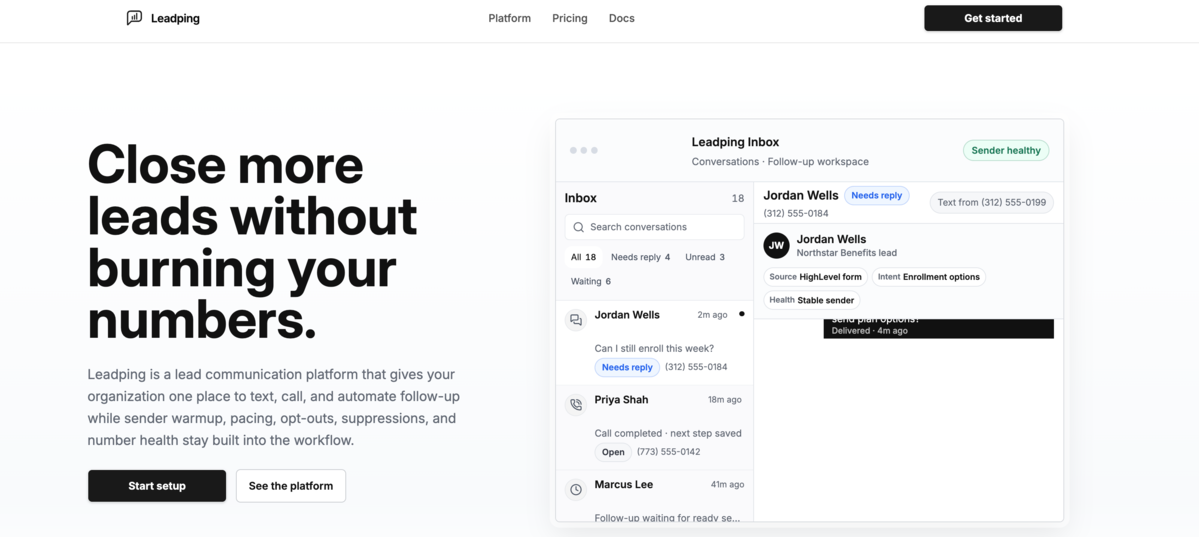
Leadping is a lead communication platform that helps sales teams text, call, and automate follow up from one centralized workspace. It organizes new leads, replies, missed calls, opt outs, and stalled conversations so teams can quickly identify the next action. Leadping also includes sender warmup, message pacing, consent tracking, suppressions, carrier registration monitoring, and number health controls to support sustainable outreach. Businesses can connect forms, advertisements, CRM systems, imports, and partner lead sources while keeping conversation history, call outcomes, and follow up activity attached to each contact.
Leadping Details
Reviewed by Add AI Directory Editorial Team
View our review methodology →Sources
- Testing status
- Researched Only
- Availability status
- Not yet verified
- Limitations
- No additional limitations documented.
Ready to try Leadping?
Check out Leadping for pricing and explore how it can streamline your workflow.
Leadping is a sales communication and lead engagement platform that helps businesses respond to new prospects through text messages, phone calls, and automated follow up workflows. The platform brings lead conversations, call activity, notes, assignments, and next steps into one shared workspace. By giving teams a clearer view of every interaction, Leadping helps reduce slow response times, missed opportunities, and inconsistent follow up.
What Is Leadping?
Leadping is a lead communication platform built for sales teams, agencies, and service businesses that regularly receive inquiries from websites, advertisements, referral partners, and other lead sources.
Instead of forcing representatives to switch between a phone system, messaging application, spreadsheet, and customer relationship management platform, Leadping organizes communication around each individual lead. Team members can review previous messages, calls, notes, assignments, and activity before deciding what to do next.
The platform is especially useful for businesses where response time can influence whether a lead schedules an appointment or contacts a competitor. Automated workflows can begin the follow up process while representatives focus on active conversations and qualified opportunities.
Leadping also includes tools designed to support responsible business messaging. Teams can monitor number readiness, sending activity, opt out requests, consent records, suppression lists, and failed message patterns from the same system.
How To Use Leadping
Businesses begin by connecting their existing lead sources to Leadping. These sources may include website forms, advertising campaigns, customer relationship management systems, imported contact lists, partner leads, or manually entered prospects.
Once a lead enters the platform, Leadping creates a centralized record containing the available contact information and communication history. The lead can then be assigned to a specific representative or routed according to the business rules established by the team.
Representatives can send text messages, place calls, add notes, and record outcomes without losing the context surrounding the conversation. Managers can also create automated follow up workflows that determine when messages should be sent and when a representative should take over.
Leadping tracks replies, missed calls, stalled conversations, assignments, and next actions so users can quickly identify which leads require attention. When a prospect responds, the team can continue the conversation from the shared workspace instead of searching through separate tools.
Businesses should configure their messaging workflows around the consent, communication, and recordkeeping requirements that apply to their organization and location.
Leadping Key Features
Shared Lead Inbox
Leadping provides a shared inbox where teams can view conversations, calls, notes, assignments, and next steps associated with each lead. This creates a more complete picture of the relationship and helps prevent multiple representatives from contacting the same person without context.
Text Messaging
Sales representatives can communicate with prospects through business text messaging. Conversations remain connected to the relevant lead record, making it easier to review previous replies and continue discussions.
Calling Workspace
Leadping allows users to place and manage phone calls alongside text conversations. Representatives can move between calling and messaging while maintaining access to the same lead history.
Automated Follow Up
Teams can build automated workflows that continue contacting leads according to predefined timing and messaging rules. Automation can help maintain consistent outreach when representatives are busy or when a prospect does not respond immediately.
Lead Routing
Leadping can route incoming opportunities to the appropriate salesperson, department, or location. Clear ownership helps reduce confusion and ensures that each lead has someone responsible for the next action.
Lead Assignments
Managers can assign leads to individual team members and monitor how opportunities progress. Assignments create accountability and help representatives understand which conversations they are expected to manage.
Activity History
The platform records messages, calls, notes, assignments, and other important interactions. This history gives users the context needed to continue a conversation without asking prospects to repeat information.
Notes and Next Actions
Representatives can add internal notes and document what should happen next. This may include scheduling another call, sending additional information, confirming an appointment, or waiting for a response.
Messaging Health Monitoring
Leadping includes tools for reviewing sender activity, message pacing, number readiness, failed sends, and other signals that may affect message delivery. These controls help teams identify potential sending problems before they disrupt an entire campaign.
Consent and Opt Out Management
Businesses can maintain records related to messaging consent and process opt out requests. Suppression controls help prevent contacts who should not receive messages from being added back into active workflows.
Carrier Registration Support
Leadping helps teams monitor the registration and setup processes associated with business messaging. This gives administrators greater visibility into whether numbers are prepared for outreach.
Lead Source Connections
The platform can receive leads from forms, advertisements, imports, customer relationship management systems, and other business tools. These connections allow companies to bring opportunities into one consistent follow up process.
Mobile Access
Mobile access allows representatives to review conversations and respond to leads while away from a desktop computer. This can be useful for field service teams, distributed sales departments, and business owners who manage inquiries throughout the day.
Leadping Use Cases
Responding to Website Leads
Businesses can send new website inquiries into Leadping and begin contacting prospects soon after a form is submitted. Faster responses can help companies reach interested prospects while the original request is still fresh.
Following Up With Advertising Leads
Leadping can help teams organize leads generated through paid search, social media, landing pages, and other advertising campaigns. Automated workflows can ensure that inquiries continue receiving attention after the first contact attempt.
Recovering Missed Calls
When a sales or service call is missed, the business can use Leadping to organize the next step. A representative may return the call, send a text message, or add the person to a follow up workflow.
Scheduling Appointments
Service businesses can use Leadping to communicate with prospects, answer basic questions, and guide qualified leads toward an appointment. Representatives can keep scheduling details and conversation history connected to the same record.
Managing Sales Team Follow Up
Managers can assign opportunities, review activity, and identify conversations that have stalled. This makes it easier to maintain a consistent sales process across multiple representatives.
Reengaging Older Leads
Businesses can organize previous prospects and create controlled follow up workflows for leads that did not initially convert. Teams can reconnect when a service becomes relevant again or when the prospect is ready to make a decision.
Supporting Multi Location Businesses
Companies with several offices or service areas can route leads according to location, department, or availability. Each branch can manage its own conversations while leadership maintains broader visibility.
Improving Lead Accountability
Leadping helps businesses document who owns each opportunity and what should happen next. This reduces the risk of leads being forgotten because responsibility was unclear.
Protecting Messaging Operations
Teams can use Leadping to monitor opt outs, suppressions, consent evidence, number health, and sending activity. These tools support more controlled communication processes as outreach volume grows.
Who Should Use Leadping?
Leadping is designed for businesses that depend on quickly contacting and following up with incoming leads. It may be particularly useful for home service companies, local businesses, marketing agencies, sales teams, appointment based companies, and organizations that generate leads through online advertising.
The platform can also support growing teams that are not ready for the complexity of a large customer relationship management system but need more structure than a basic texting application or spreadsheet.
Companies with multiple sales representatives may benefit from the shared inbox, lead assignments, routing controls, and centralized activity history. Smaller businesses can use the platform to reduce manual follow up and keep customer conversations organized.
Benefits of Using Leadping
Leadping gives businesses one place to manage lead communication across text messages and phone calls. This reduces the need to piece together information from disconnected applications.
Automated workflows can continue follow up even when representatives are managing other responsibilities. Lead routing and assignments help establish ownership, while activity histories provide the context required to continue each conversation.
The platform also gives teams greater visibility into messaging health, consent records, opt outs, suppression lists, and sender setup. These controls can become increasingly important as a business expands its communication volume.
By combining communication, automation, organization, and messaging controls, Leadping helps teams create a more consistent process for moving new inquiries toward appointments and sales conversations.
Leadping FAQ
Is Leadping a CRM?
Leadping includes several lead management features, but its primary focus is communication and follow up. It may be used alongside an existing customer relationship management system or as a focused workspace for businesses that do not need a complex CRM.
Can Leadping send text messages?
Yes. Leadping allows teams to send and receive business text messages while keeping conversations connected to individual lead records.
Does Leadping support phone calls?
Yes. Users can manage calling activity alongside text messages, notes, assignments, and other lead information.
Can Leadping automate lead follow up?
Yes. Businesses can create automated workflows that contact leads according to established timing and messaging rules.
Can Leadping assign leads to sales representatives?
Yes. Lead routing and assignment tools help businesses direct each opportunity to the appropriate person or team.
Does Leadping track conversation history?
Yes. The platform maintains an activity history that can include text messages, calls, notes, assignments, and next actions.
Can Leadping connect with website forms?
Leadping is designed to receive leads from forms and other common lead sources. The exact connection method may depend on the website platform and existing business tools.
Does Leadping include opt out management?
Yes. Leadping includes tools for processing opt out requests and maintaining suppression controls.
Can Leadping help monitor messaging health?
Yes. The platform provides visibility into number readiness, sending activity, message pacing, failed sends, and other operational signals.
Is Leadping suitable for agencies?
Leadping may be useful for agencies that generate, distribute, or manage leads for clients. Agencies can use its communication, routing, assignment, and activity tracking features to create a more organized follow up process.
Why We Featured Leadping on Add AI Directory
We featured Leadping because it addresses a common problem for sales teams and service businesses: new leads often arrive faster than teams can consistently organize and follow up with them.
Leadping combines texting, calling, automation, routing, assignments, and activity tracking in a focused workspace. Its emphasis on communication history and clear next actions can help businesses respond faster without losing important context.
The platform also goes beyond basic outreach by including messaging health, consent, opt out, suppression, and sender setup tools. This combination makes Leadping a practical option for businesses that want to improve lead response times while maintaining greater control over their communication processes.
Ready to try Leadping?
Check out Leadping for pricing and explore how it can streamline your workflow.
Explore More AI Agents
Discover other AI agents and tools to enhance your workflow and productivity.
Browse all AI agentsSimilar to Leadping

Placement API
Placement API is an API and hosted MCP server that lets AI agents and SEO tools research and buy backlink placements. Agents can search publishers from 10 suppliers, compare supplier prices for the same domain, and turn a brief into a priced link plan with suspect domains filtered out. Read-only keys handle research, while purchases need a separate order key, prepaid credits, and server-enforced spending caps. Searching the catalogue and signing up are free.

Arvow
Arvow is an AI SEO platform for marketers and agencies. Its agents help research, write, and publish content in a brand’s voice, identify technical SEO issues, and find relevant sites for contextual backlinks. Arvow also tracks brand mentions across AI search tools, bringing content, site optimization, link building, and AI visibility into one platform.

Google Ads Advisor
Google Ads Advisor and Analytics Advisor are AI powered assistants that help advertisers optimize campaigns, understand data, and make faster decisions across Google Ads and Google Analytics. They combine generative AI, real time insights, and account level learning to simplify how marketers manage performance. By integrating optimization tools, conversational analysis, and automated recommendations, the advisors make it easier to create high quality assets, discover growth opportunities, troubleshoot issues, and improve results. With personalized guidance, natural language interaction, and automated actions, these AI agents help teams streamline workflows, reduce manual effort, and scale more effective advertising strategies.
Trending AI Agents

Maeve Social
Maeve Social is a social media management platform for planning, approving, scheduling, and publishing content to nine social platforms. It adds a shared inbox, analytics with PDF reports, an AI assistant, and a REST API, CLI, and MCP server for connected automation, with a 3 day free trial.

SuperEbook
SuperEbook is an AI ebook studio that writes ebooks, guides, and lead magnets from your own notes, courses, or transcripts, then designs a cover and exports PDF, EPUB, and DOCX files. Planning an outline is free, new accounts get 50 free credits with no card, and books can also be created from Claude, ChatGPT, and other MCP clients.

DeepCheck
DeepCheck is an AI people finder that searches public profiles and web results in one place. Enter a name, email address, username, or location and it gathers public web pages, images, social accounts, LinkedIn profiles, and web mentions, with an AI organized summary on paid searches. The first search is free with no account or card, and more searches come in one time packs with no subscription.