
Hex

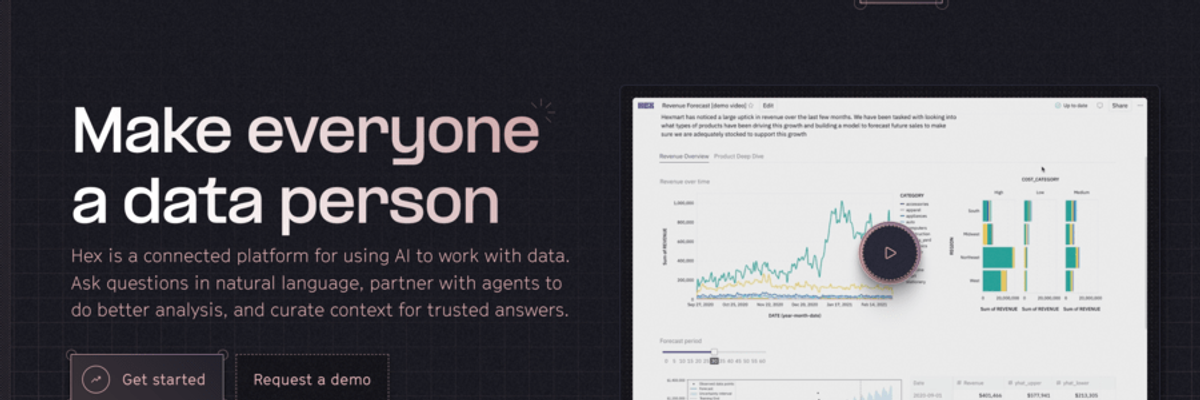
Hex is an AI-powered data science and analytics platform that merges notebooks, dashboards, and conversational insights. It supports SQL, Python, and natural language prompts, helping teams turn data into shareable apps. Hex offers a freemium model, with paid plans providing advanced AI and enterprise features.
Hex Details
Overview of Hex
Hex is an AI powered analytics platform that helps data teams explore information, write queries, build visualizations, and share insights from one connected workspace. It combines SQL, Python, visual analysis tools, artificial intelligence, and interactive data apps so teams can move from a business question to a useful answer without constantly switching between separate platforms.
The platform is designed for both technical analysts and business users. Data professionals can perform detailed analysis using code, while other team members can explore approved data, ask questions in natural language, and interact with published reports. This makes Hex useful for organizations that want to make analytics more collaborative without sacrificing control, transparency, or access to the underlying logic.
What Is Hex?
Hex is a collaborative data workspace built for analytics, data science, reporting, and business intelligence. It gives users a notebook environment where they can connect to company data, write SQL queries, run Python code, create charts, document findings, and organize an analysis within a single project.
Each Hex project begins as a notebook. Users can add different cells for SQL, Python, charts, tables, written explanations, input controls, and other analytical components. These cells can work together so the results from one part of the project can be used in another.
Once an analysis is complete, selected notebook elements can be published as an interactive data app, report, or dashboard. This allows analysts to conduct technical work behind the scenes while presenting a cleaner experience to stakeholders.
Hex also includes artificial intelligence features that help users create, edit, explain, and debug analytical work. The Notebook Agent can understand the context of a project, including connected data, existing cells, variables, and upstream dependencies. Users can ask it to write SQL, modify Python, build charts, explain calculations, or help develop a complete analysis.
For less technical users, Hex provides conversational tools that allow people to ask questions about approved company data using natural language. Organizations can support these experiences with semantic models, trusted metrics, business definitions, and other forms of shared context.
How To Use Hex
Start by creating a Hex workspace and connecting the data sources your team needs to analyze. Hex can connect to common databases, data warehouses, lakehouses, cloud storage platforms, and other parts of a modern data stack. Workspace administrators can manage these connections and control which users have access to each source.
After connecting your data, create a new project. A project is the main workspace where you build an analysis. You can begin with an empty notebook, use a template, import an existing notebook, or explore available data through the data browser.
Add a SQL cell when you want to query information from a connected database or warehouse. The results can be passed into another cell for further filtering, visualization, or statistical analysis.
Add a Python cell when you need more advanced transformations, forecasting, machine learning, statistical analysis, or custom visualizations. SQL and Python can be used within the same project, allowing analysts to choose the appropriate language for each step.
Users who prefer a visual interface can work with chart cells, table cells, pivot tools, input controls, and other no code components. These tools make it possible to explore data and build visualizations without manually writing every query or calculation.
The Notebook Agent can assist throughout this process. You can describe the question you are trying to answer and ask the agent to draft a query, modify a cell, explain an error, create a visualization, or suggest the next step in the analysis. Generated code and calculations should still be reviewed to confirm they match the intended business logic.
When the analysis is ready to share, open the app builder and select the notebook elements that should appear in the published version. Rearrange charts, tables, written explanations, and controls to create an experience that is easier for stakeholders to understand.
Publish the project as a report, dashboard, or interactive data app. Depending on the permissions provided, stakeholders may be able to view results, adjust filters, explore the underlying data, ask follow up questions, or inspect parts of the analysis.
Teams can continue updating the notebook after publication. This makes it possible to improve the underlying analysis while maintaining a consistent experience for the people using the published app.
Hex Key Features
Collaborative Data Notebooks
Hex provides shared notebooks where teams can use SQL, Python, visual tools, and written explanations together. Multiple users can contribute to an analysis, review work, leave comments, and develop projects collaboratively.
Notebook Agent
The Notebook Agent helps users generate and edit SQL, Python, charts, tables, and written content. Because the agent can access the context of the current project, it can provide assistance based on connected data, existing cells, variables, and analytical dependencies.
SQL and Python Support
Users can move between SQL and Python within the same analysis. SQL can be used to query and organize warehouse data, while Python can support deeper analysis, statistical modeling, forecasting, and custom processing.
No Code Analysis Tools
Hex includes visual tools for creating charts, tables, pivots, filters, calculations, and input controls. These components help users explore and present data without needing to write code for every action.
Interactive Data Apps
Notebook content can be published as an interactive app, report, or dashboard. Analysts can control what stakeholders see while preserving the complete technical workflow in the underlying notebook.
Conversational Data Analysis
Business users can ask questions about trusted company data using natural language. This can reduce the number of routine questions sent to analysts while giving users a more accessible way to investigate business performance.
Semantic Models
Hex supports shared definitions for business metrics, dimensions, and relationships. Semantic models help ensure that users and AI systems work from consistent definitions when calculating important measurements.
Data Connections
Teams can connect Hex to databases, warehouses, cloud storage platforms, and other data infrastructure. This allows users to work with current organizational data without relying entirely on manual file exports.
Visual Data Exploration
Users can create charts, maps, tables, dashboards, and other visual elements directly within a project. Visual tools can be combined with code and written explanations to create complete data stories.
Project Templates
Hex provides templates for common analytical tasks such as exploratory analysis, customer behavior analysis, forecasting, reporting, sentiment analysis, and performance measurement. Templates can give teams a starting point for recurring projects.
Collaboration and Comments
Users can share projects, leave feedback, mention teammates, and review analytical work in the same workspace. This helps shorten the feedback process between data teams and business stakeholders.
Version Management
Teams can track changes to projects and maintain greater visibility into how an analysis develops. Version history also makes it easier to review previous work and understand when important logic was modified.
Reusable Components
Common logic, metrics, queries, and analytical elements can be reused across projects. This reduces duplicate work and helps teams maintain consistency across reports.
Governance and Permissions
Administrators can manage data access, project permissions, artificial intelligence features, workspace roles, and publishing controls. These settings help organizations provide broader access to analytics while protecting sensitive information.
Hex Use Cases
Exploratory Data Analysis
Analysts can investigate new datasets, identify patterns, review distributions, examine unusual values, and test potential explanations. SQL, Python, visual cells, and artificial intelligence assistance can all be used within the same exploratory workflow.
Business Intelligence Reporting
Teams can build dashboards and reports for revenue, marketing, product usage, customer activity, operational performance, and other important business measurements. Published apps can provide stakeholders with updated information and interactive controls.
Customer Behavior Analysis
Hex can be used to study customer segments, purchasing behavior, product engagement, retention, conversion, and churn. Analysts can combine warehouse data with statistical methods to identify patterns that may influence business decisions.
Product Analytics
Product teams can analyze feature adoption, user journeys, activation, engagement, and retention. Results can be shared through interactive reports that allow stakeholders to explore different user groups or time periods.
Marketing Analytics
Marketing teams can evaluate campaign performance, acquisition channels, customer value, conversion rates, and attribution data. Analysts can build reusable reports that help marketing leaders understand which activities are contributing to growth.
Financial Analysis
Finance teams can create revenue reports, budget comparisons, forecasts, profitability analyses, and performance models. Input controls can allow stakeholders to explore different assumptions and scenarios.
Forecasting
Data scientists can use Python and warehouse data to build forecasts for sales, demand, customer activity, inventory, staffing, or other business outcomes. Forecast results can then be presented through charts and interactive applications.
Operational Reporting
Organizations can monitor service levels, fulfillment, support performance, delivery times, inventory, and other operational measurements. Reports can be scheduled or refreshed as new data becomes available.
Executive Dashboards
Data teams can create focused reports that present leadership with important measurements, trends, risks, and opportunities. The underlying notebook preserves the analytical logic while the published app provides a cleaner presentation.
Self Service Analytics
Approved data, semantic models, and conversational analysis tools can give business teams more freedom to answer routine questions independently. This allows analysts to spend more time on complicated investigations and strategic work.
Data Science Projects
Hex can support experimentation, statistical analysis, model evaluation, feature development, and other data science workflows. Code, documentation, results, and stakeholder facing presentations can remain connected within the same project.
Automated Reporting
Teams can create reports that refresh using connected data. This can reduce the need to manually rebuild recurring weekly, monthly, or quarterly presentations.
Hex FAQ
Does Hex require coding experience?
Hex can be used with SQL and Python, but it also provides visual tools for building charts, tables, pivots, filters, and interactive controls. Technical users can work directly with code, while less technical users can explore published apps and conversational analytics experiences.
Can Hex replace a traditional notebook?
Hex can serve as an alternative to traditional data notebooks for teams that want cloud based collaboration, managed data connections, interactive publishing, artificial intelligence assistance, and built in visual tools. The best choice depends on the organization’s technical requirements and existing workflow.
Can Hex create dashboards?
Yes. Users can turn notebook cells into interactive dashboards, reports, and data apps. Charts, tables, written explanations, filters, and input controls can be arranged in a stakeholder friendly layout.
Does Hex support SQL and Python?
Yes. Hex allows users to combine SQL and Python within the same project. This makes it possible to query data with SQL and perform more advanced analysis with Python without moving the work into a separate platform.
What is the Hex Notebook Agent?
The Notebook Agent is an artificial intelligence assistant that can help generate, edit, explain, and debug analytical work. It can assist with SQL, Python, charts, tables, written explanations, and broader notebook development.
Can business users use Hex?
Yes. Business users can view and interact with published reports, dashboards, and data apps. Depending on their permissions, they may also explore data, adjust inputs, ask natural language questions, and investigate results without directly editing the original notebook.
Can teams collaborate inside Hex?
Yes. Hex supports shared projects, comments, mentions, permissions, and collaborative editing. These capabilities allow analysts, data scientists, and business stakeholders to work together throughout the analytical process.
Can Hex connect to a data warehouse?
Yes. Hex supports connections to common data warehouses, databases, lakehouses, cloud storage platforms, and other data systems. Available connections and permissions are generally managed by workspace administrators.
Does Hex include semantic modeling?
Yes. Teams can define or connect semantic models containing approved metrics, dimensions, and relationships. These models help maintain consistent business definitions across human analysis and artificial intelligence generated answers.
Is Hex only for data scientists?
No. Hex is used by data scientists, analysts, analytics engineers, business intelligence teams, product teams, finance teams, marketing teams, and other departments that need to work with organizational data.
Why We Featured Hex on Add AI Agents
We featured Hex because it brings artificial intelligence directly into a complete analytics workflow. Instead of functioning only as a chatbot or code generator, Hex connects AI assistance with data sources, notebooks, queries, visualizations, semantic models, and published applications.
The platform can assist technical users while also making data more accessible to people outside the data team. Analysts can use SQL and Python for detailed work, while business users can interact with reports or ask questions using natural language.
Hex also addresses an important challenge in AI powered analytics: providing enough business context for generated answers to be useful. Its support for shared metrics, semantic models, approved data, and project context can help organizations create more consistent analytical experiences.
For teams trying to reduce the distance between data exploration and business decision making, Hex provides a connected environment for asking questions, conducting analysis, reviewing logic, and sharing results.
Ready to try Hex?
Hex may be worth exploring if your organization wants to combine data notebooks, business intelligence, artificial intelligence, and interactive reporting within one collaborative workspace.
Data teams can use Hex to conduct advanced analysis with SQL and Python, while business users can explore published results through apps, dashboards, and conversational tools. Organizations can begin with a focused project, connect a trusted data source, and evaluate how Hex fits into their current analytics process.
Explore More AI Agents
Discover other AI agents and tools to enhance your workflow and productivity.
Browse All AgentsRelated AI Agents
View All Agents →
Placement API
Placement API is an API and hosted MCP server that lets AI agents and SEO tools research and buy backlink placements. Agents can search publishers from 10 suppliers, compare supplier prices for the same domain, and turn a brief into a priced link plan with suspect domains filtered out. Read-only keys handle research, while purchases need a separate order key, prepaid credits, and server-enforced spending caps. Searching the catalogue and signing up are free.

Tale
Tale is an open-source project workspace for teams and AI agents. Teammates plan tasks on a shared board, assign work to people or agents, and review the results together, while agents run in persistent sandboxes using runtimes such as Claude Code and Codex. It combines task boards, shared knowledge, workflows, and governance controls, and can be self-hosted with Docker or run as managed Cloud. Tale is MIT licensed, and the free Community edition includes every feature.

VoiceDrop
VoiceDrop is a ringless voicemail and SMS platform built for sales teams. It clones a user’s voice from roughly a 30-second sample and delivers personalized voicemails to US mobile and VoIP numbers without ringing the phone, with two-way SMS in the same workflow. Billing applies only to successful deliveries, and the platform includes SOC 2 Type II compliance, Do Not Call suppression, phone validation, a REST API, and Zapier and Make integrations.
Trending AI Agents
View All Agents →
Site Speak
SiteSpeak AI lets you train a custom chatbot on your website content, FAQs, and documents. Site Speak AI can answer visitor questions instantly, 24/7, with no coding required.

Murf AI
Murf AI is a text-to-speech platform that transforms written content into lifelike voiceovers. It’s perfect for creators, educators, and businesses needing high quality narration without recording audio manually.

Synthesia
Synthesia is an AI video generation platform that lets users create professional-looking videos using realistic AI avatars. It enables anyone to turn text into engaging videos in minutes—no cameras, microphones, or actors required.
Placement API
Placement API is an API and hosted MCP server that lets AI agents and SEO tools research and buy backlink placements. Agents can search publishers from 10 suppliers, compare supplier prices for the same domain, and turn a brief into a priced link plan with suspect domains filtered out. Read-only keys handle research, while purchases need a separate order key, prepaid credits, and server-enforced spending caps. Searching the catalogue and signing up are free.
Tale
Tale is an open-source project workspace for teams and AI agents. Teammates plan tasks on a shared board, assign work to people or agents, and review the results together, while agents run in persistent sandboxes using runtimes such as Claude Code and Codex. It combines task boards, shared knowledge, workflows, and governance controls, and can be self-hosted with Docker or run as managed Cloud. Tale is MIT licensed, and the free Community edition includes every feature.
VoiceDrop
VoiceDrop is a ringless voicemail and SMS platform built for sales teams. It clones a user’s voice from roughly a 30-second sample and delivers personalized voicemails to US mobile and VoIP numbers without ringing the phone, with two-way SMS in the same workflow. Billing applies only to successful deliveries, and the platform includes SOC 2 Type II compliance, Do Not Call suppression, phone validation, a REST API, and Zapier and Make integrations.